
How much does Revit cost? Price, bundle and advice
 By Adrian NovakCAD & Autodesk specialist
How much does Revit cost, and is it worth it? The figure is easy to quote, but with Revit that figure is only half the story. Revit is one of the pricier programs Autodesk sells, which is exactly why the real question is not only what it costs, but whether you need the full Revit at all, whether you should buy it on its own or as part of a bundle, and how to keep the bill as low as the law allows. This article gives you the number and the judgement around it, so you come away knowing not just what Revit costs but whether it is worth that money for the work you actually do.
I will give you the official price, explain what you get for it, set out when standalone Revit makes more sense than the wider bundle, and flag what to watch so you do not overpay. All without the usual hint that expensive automatically means necessary, because with Revit a great many people pay for far more than they use.
What does Revit officially cost?
Revit is a subscription, so you pay by the year or by the month for as long as you use it. On autodesk.com, Revit cost €3,159.00 per year on 10 August 2026. Alongside it sits the AEC Collection, a bundle that brings together Revit and a run of other building programs; that cost €3,860.00 per year. The gap between the two is small enough to be worth pausing over before you decide.
| Product | What you get | Price per year |
|---|---|---|
| Revit (standalone) | Revit only | €3,159.00 |
| AEC Collection | Revit plus AutoCAD, Civil 3D and more building programs | €3,860.00 |
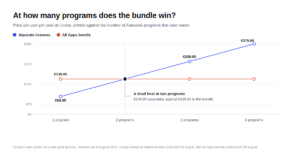
Put the two side by side and something stands out: for just over seven hundred euros more a year, the bundle gives you not only Revit but also AutoCAD and a handful of other programs. If you use more than Revit from that list, the bundle quickly works out cheaper than buying the separate packages one by one. If you genuinely only use Revit, the bundle means paying for programs that sit idle.
What is striking is how small the difference between standalone and bundle really is next to the total price. Precisely because standalone Revit is already so dear, the extra cost of the bundle all but disappears the moment you use even a second program from it. That pricing is deliberate: Autodesk makes the bundle attractive to steer you towards the larger package. That is no reason to avoid it, but every reason to count honestly which programs you will really open before you accept the tempting sum.
What do you get for that price?
For that money you are not buying a drawing program but a complete design system for buildings. Revit works from a single coherent model in which a wall is a wall and a window is a window, with all the properties that go with them. Every drawing, view and schedule comes out of that one model automatically, and a change in one place changes everywhere at once. That is the heart of BIM, and it is exactly where the price comes from.
So you are not paying for prettier drawings but for coherence and fewer costly mistakes. On a larger building project where several parties work on the same building, that prevents the errors that creep in when everyone is working from loose, out-of-date drawings. When the structural engineer moves a beam, the architect sees the knock-on effect the same day, rather than discovering it as a clash on the building site, where putting it right costs many times what it would have on screen. For anyone in that world, Revit pays for itself in mistakes avoided, not in hours saved. For anyone who does not design buildings, that same price is simply money thrown away.
Keep in mind, too, that the price is a recurring cost, not a one-off purchase. Unlike a program you buy once and use for years, with Revit you pay again every year, and the software stops working the moment you stop paying. That makes the question “do I use this enough” even more important than it would be with a one-off buy, because a subscription you renew out of habit while barely touching it is one of the most expensive mistakes you can make with software of this kind.
Is there a cheaper alternative?
That depends on what you do. If you mostly draw in two dimensions and do not need the coherence of a BIM model, Revit is simply too heavy and too dear for your work, and a drawing program such as AutoCAD, or a cheaper alternative, makes more sense. If you do design buildings but are unsure whether you need standalone Revit or the wider bundle, the saving is not in a different program but in the right choice between those two.
The biggest mistake in thinking is buying Revit because it is the familiar name in construction, without checking whether you actually use its strengths. What fits your work, and whether AutoCAD or Revit is the more sensible tool, I work through in AutoCAD or Revit. Only once it is settled that you need Revit does the price question even arise.
Why is Revit so expensive?
Because you are not buying a drawing tool but a complete system that manages the coherence of an entire building, plus the continuous development that goes with it. Part of what you rent each year is a stream of updates, new features and support, so the price also buys the software staying current rather than ageing on your machine. Autodesk charges the price it can command in the professional construction market, where Revit is the standard for many practices and where the cost is part of a project rather than an expense in its own right. To a private individual or a small firm, that figure therefore feels wildly high, and it is, because the price was never set with them in mind.
That also explains why hunting for a free copy is so tempting, and why it is such a poor idea with expensive professional software in particular. Anyone working in construction who is caught on a cracked Revit, or cannot prove their licence in an audit, risks not just a fine but their whole way of doing business. The high price is a reason to buy cleverly and legally, not to head down the illegal route.
Revit for students: free
If you are studying or teaching, you need not pay that price at all. Autodesk offers Revit free through an education licence, with the full set of features, usually valid for a year and renewable for as long as you stay enrolled. In return, you may use it strictly for educational purposes, and you have to be able to show that you are a student or a teacher.
This is the best way to learn Revit at no cost, but also the most tightly drawn. The moment you earn money with it, even as a student, you fall outside the education licence and need a paid subscription. A graduation project for a real client with an invoice behind it is no longer educational use. It is tempting to stretch that boundary, but it is exactly the boundary Autodesk watches, so do not.
Buy standalone, or the AEC Collection?
This is the decision that can save or cost you the most money. Standalone Revit is cheaper if you truly only use Revit. But the moment you also need AutoCAD, or Civil 3D for infrastructure, or one of the other building programs in the bundle, the maths tips quickly towards the AEC Collection, because buying those programs separately soon costs more together than the difference with the bundle.
The rule of thumb is simple: if you use only Revit, buy Revit on its own; if you use two or more of the bundled programs, the AEC Collection is almost always the better value. The most common pairing by far is Revit with AutoCAD, and on its own that combination is usually enough to make the bundle the cheaper of the two, before you even count Civil 3D or the rest. Work it out for yourself with the programs you genuinely use, not the ones you might one day get round to. That full calculation, and when the bundle pays off, is set out in Revit or AEC Collection.
Watch out, in that decision, for the trap of buying “just in case”. The bundle looks attractive because you get so much for it, and that tempts people to take it while, in practice, they only ever open Revit. You then pay just over seven hundred euros extra every year for programs you never start. So buy the bundle only when you can point to the specific other programs you will use, not because the package feels more complete. Completeness you do not use is simply a higher bill.
Can Revit come in below list price?
Autodesk’s list price is not always the only rate on offer. From a reliable seller, Revit is often cheaper than the figure on autodesk.com, provided you pay attention to where it comes from. Because Revit is sold as a subscription, the perpetual second-hand licence you had with older programs does not exist here; you save not with an old key but by buying from the right party.
Watch, then, what a reliable seller gives you: an invoice in your name, an explanation of where the licence comes from, and help when activation stalls. A licence of unknown origin, or a suspiciously low price with no paperwork, is a risk you only notice at the moment the licence is blocked or an audit asks for proof. The real saving lies in a lower price with certainty, not in the lowest price without it.
For a business there is more to it: Revit is a normal, deductible business cost, and the certainty of a demonstrably legal licence is often a condition for clients and tenders. Seen that way, the price of Revit is not only an outlay but also the entry ticket to work where doing things properly is a requirement, and that makes the legal route the only one that is genuinely cheap in the long run.
There is one more way to bring the cost down that has nothing to do with the purchase itself: pay yearly rather than monthly. As with most subscriptions, the monthly rate works out dearer than the annual one, so anyone certain they need Revit for a year pays the least on an annual subscription. If you are unsure you will use it that long, the monthly rate can actually be the wiser choice despite the higher price per month, because you are not then tied to a whole year. That, too, is a choice you make on purpose rather than drift into.
Is Revit worth the price?
For the right user, absolutely; for the wrong one, not for a moment. If you design buildings and collaborate on construction projects, Revit, for all its high price, is often not a luxury but a requirement, and it earns its keep in coherence and fewer mistakes. Then the question is not whether you pay, but how you buy it legally and as cheaply as you sensibly can.
If you do not design buildings, or you mostly draw in two dimensions, Revit is simply the wrong tool, and every euro you spend on it is one too many. So do not begin with the price but with your work: first decide whether you really need Revit, then choose between standalone and the bundle, and only then buy, from a reliable party at a fair price. In that order you pay exactly what Revit is worth to you, and not a euro more.
Read also
Buying software the smart way?
Explore our genuine licences with instant delivery and support.