
Which Autodesk Software Suits You? Choose by Trade
 By Adrian NovakCAD & Autodesk specialist
Which Autodesk software you need is decided by your trade, not by the list of things a package can do. That sounds obvious, but it is exactly where people go wrong: they choose on everything a suite is capable of, and end up buying too much. The honest question is not “which is best”, but “what do I do all day, and what is the smallest thing that covers it”.
Below I go through the packages by discipline, with Autodesk’s real list prices attached, and I say plainly when you should not take a bundle.
Start with your trade, not the software
Autodesk makes dozens of programs, but most people need one, sometimes two. The skill is not finding the most powerful suite, but the one that fits your work and nothing more. Every title you buy but never open is wasted money, and with Autodesk those amounts add up fast. It is tempting to think more features can never hurt, but with software billed yearly and per user, you pay for every unused feature again every twelve months.
So before we look at prices, the key step: name what you make. Do you draw flat plans and sections, or build whole building models? Do you design machines or products, or produce images and animation? The answer nearly always points to a single program.
Pay attention, too, to what your surroundings expect. Software does not live on its own: you deliver files to clients, contractors or colleagues, and they expect a certain format. If your whole chain works in Revit, delivering an AutoCAD drawing is awkward, and the reverse just as much. The question “what does the rest of my field use” is sometimes more important than which program you personally prefer, because you have to be able to exchange with it.
| What you do | The program that fits |
|---|---|
| 2D drawings, plans, technical details | AutoCAD |
| Designing buildings with BIM, services included | Revit |
| Machines and mechanical parts | Inventor |
| Product design with simulation and manufacturing in one | Fusion |
| Animation for film and games | Maya |
| Visualisation and archviz, photorealistic images | 3ds Max |
| Infrastructure, roads and terrain | Civil 3D |
AutoCAD or Revit: the confusion that comes up most
Most of the doubt sits between these two, and understandably so, because they overlap at the edges. The difference in one sentence: AutoCAD draws lines, Revit builds a model. In AutoCAD you place a wall as two lines; in Revit you place a wall that knows it is a wall, with a thickness, a material and a relationship to the roof above it.
If you work only on 2D drawings, or deliver to parties expecting AutoCAD files, then AutoCAD is the right choice and Revit is overkill. If you work on buildings where a change to the plan must flow automatically into the section and the material schedule, then Revit is the tool and AutoCAD would slow you down. We set that choice out at length in AutoCAD or Revit.
The prices that sharpen the choice
Autodesk charges per user and per year, and the amounts are hefty. On autodesk.com these list prices stood on 9 August 2026: AutoCAD €2,203 a year, Revit €3,159 a year, Fusion €714 a year, and the AEC Collection €3,860 a year for one user. Autodesk itself notes “estimated tax included” beside that collection figure.
Two things stand out. First: it is per user, not per computer. Two people using the same program need two licences, even on the same PC. Second: the gap between a single title and a collection is smaller than you would think. Revit alone costs €3,159, the whole AEC Collection €3,860. Which brings us to the sum most people get wrong.
When is the AEC Collection or All Apps worth it?
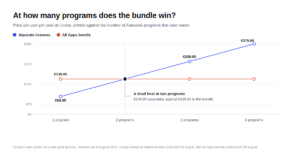
A collection pays off as soon as you genuinely use three or more titles. If you are in construction and work with Revit, AutoCAD and Civil 3D, the AEC Collection is cheaper than those three separately, and then it is an easy call.
But if your work revolves around one program, a collection mostly buys software you never open. Someone using only Revit spends nearly seven hundred euro a year extra on titles gathering dust. The familiar advice “when in doubt take the bundle, it is more flexible” therefore holds only when the doubt is genuinely about several programs. Unsure between two, just do the arithmetic; not unsure at all, buy the one title.
A concrete sum makes it sharp. Use only Revit and you sit at €3,159 a year, with the AEC Collection adding €701 on top, money for software you never touch. Use Revit and AutoCAD, and those two separately already cost over five thousand euro, so the €3,860 collection is suddenly a real saving. The tipping point is not “two programs maybe” but “two programs for real, or more”. Below that point the single title is the frugal choice, above it the bundle.
Do I need AutoCAD or AutoCAD LT?
Another choice that saves money. AutoCAD LT is the lighter, cheaper variant that does everything you need for 2D drafting. The difference from full AutoCAD lies in 3D modelling and in the ability to work with your own automations and industry-specific toolsets.
Draw purely in 2D, plans, details, schematics, and LT is probably enough, and you are not paying for 3D tools you never touch. Work with 3D models or the specialised toolsets for, say, mechanical or electrical work, and you need the full version. It is the same logic as the collection: buy the level that fits your work, not the level that impresses.
Machinery and product design: Inventor or Fusion
If you make physical things, the choice comes down to Inventor versus Fusion, and those two are less interchangeable than they look.
Inventor is the classic choice for mechanical design and machine building, with strong tools for large assemblies and technical drawings derived from the 3D model. Fusion is younger and bundles design, simulation and manufacturing, CAM for CNC machines included, in one package. For a small studio or a sole trader doing everything from design to milling, Fusion is often the more sensible fit, not least because the standalone subscription at €714 a year sits well below the heavy packages.
If you are in between and also weighing SolidWorks, more than price is at play. That comparison stands on its own in Fusion vs Inventor vs SolidWorks.
Image and animation: Maya or 3ds Max
In the creative corner the dividing line is fairly clear. Maya is the standard for animation and character work in film and games. 3ds Max is stronger in visualisation and archviz: photorealistic images of interiors, buildings and products. Many studios producing renders for construction pick 3ds Max, precisely because it dovetails with the models coming out of Revit.
Worth knowing: a render package is not a modelling package. Maya and 3ds Max make your images beautiful, but the structure itself you draw in AutoCAD, Revit or Inventor. Anyone in construction or engineering therefore nearly always has two tools: one to design and one to show.
That is also where a collection suddenly does make sense. An architecture practice designing in Revit and presenting in 3ds Max uses two heavy titles, both in the AEC Collection. The moment you combine a tool to design and a tool to show, you count almost automatically toward that tipping point. If your work sits purely at the image, say you render models others supply, one render package is enough and the rest of the collection is ballast.
How many licences do you really need?
After the choice of program, this is the question that moves the most money, and it is often answered wrongly. Autodesk charges per user. That means not per computer and not per project, but per person using the software.
For a sole trader it is simple: one person, one licence, whether you work on a laptop and a desktop. For a small firm it is more nuanced. Two drafters both using Revit need two licences, even if they take turns at the same workstation. When people work at different times, there is no way to share one licence lawfully as though it were an office-wide subscription.
The practical lesson: count the people, not the machines. And do not buy ahead for growth that may not come. Adding a licence later is always possible; a year paid for a seat that stays empty you do not get back.
There is one more angle worth a sentence, because it trips up growing teams. When you do add people, keep the whole team on the same choice: mixing a single title for one drafter with a collection for another creates two kinds of file and two kinds of support headache. It is usually cheaper in the long run to standardise on one setup than to save a little per seat and pay for the confusion later.
When to buy nothing yet
There are two cases where I would wait.
If you are still studying, or teaching, Autodesk offers its software free for education. That is a separate route, straight from Autodesk, and as long as you qualify you need buy nothing. Buying a paid licence while entitled to the education version is a waste. Do note that an education licence is not meant for commercial work; if you are going to earn money from your designs, you still need a normal licence.
And if you do not yet know which field you are heading into, or want to try a program first, there are free trials. Buy only once you know you will use it and what for. The costliest decision with Autodesk is not picking the wrong title, but buying an expensive title you end up leaving idle.
Why the same program costs so much less here
The figures above are Autodesk’s own list prices. We sell the same software for a fraction of that, and it is no trick, it is the second hand market the European Court of Justice expressly allows. A perpetual licence sold before, whose previous owner has given it up, may be sold again.
What to watch is not the price but the provenance: a clean transfer of a whole licence is a different thing from a split volume key. That legal side, and how to spot a reliable seller, we set out in is second hand software legal. It is worth reading before you order an expensive title, because with Autodesk in particular the difference sits in the detail.
So, the other way round from a summary, because a summary adds nothing: choose on your trade, buy the smallest thing that covers it, and take a collection only when you really use three titles from it. Still unsure between two programs, read the targeted comparison and work the difference out for yourself. That takes ten minutes and may save you hundreds of euro a year.
Read also
Buying software the smart way?
Explore our genuine licences with instant delivery and support.