
Revit on its own or the AEC Collection? The maths
 By Adrian NovakCAD & Autodesk specialist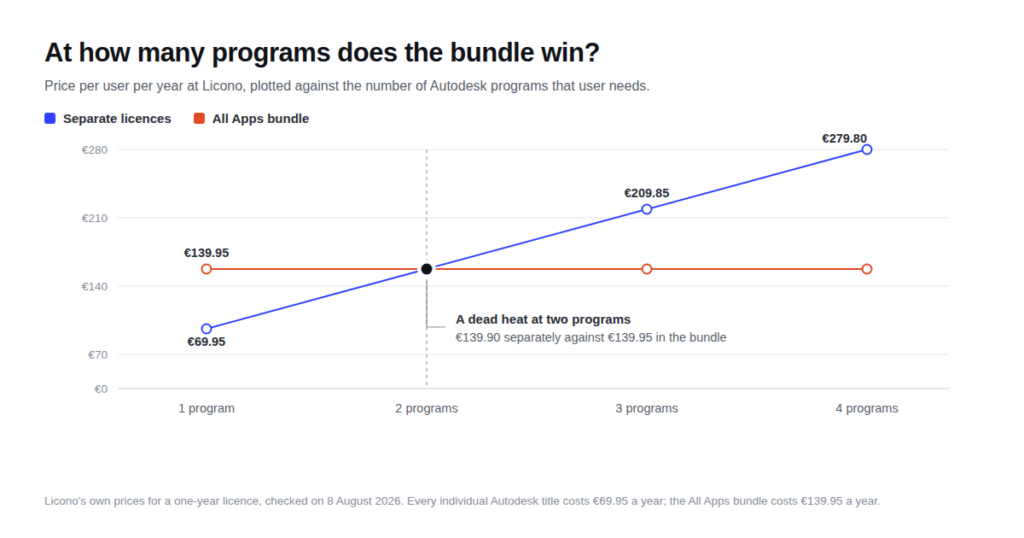
Autodesk already does this sum for you. On the page for the Architecture, Engineering & Construction Collection there is a table in which three separate subscriptions add up to €6,101 a year against €3,860 for the collection, with “Save €2,241/year” printed underneath. The arithmetic is correct. It just does not answer the question you actually have, which is whether you need to buy anything beyond Revit at all.
The short answer: what decides it is the number of Autodesk programs one person genuinely opens, and the point where the collection becomes the cheaper option is not the same everywhere. At Autodesk list prices it tips as soon as someone needs AutoCAD alongside Revit. At our prices that point sits one program further along. Once you have more than one workstation to equip, that difference leads to a different decision than the vendor’s own table suggests.
Every figure on this page was checked on 8 August 2026: the list prices on Autodesk’s own collection page, our prices in the shop.
What Autodesk works out, and what goes into that sum
The comparison table on the collection page has three lines. This is what it said on 8 August 2026, per user, per year, paid annually.
| Product | Separately, per year |
|---|---|
| AutoCAD | €2,203 |
| Revit | €3,159 |
| Forma Site Design | €739 |
| Total, bought separately | €6,101 |
| AEC Collection | €3,860 |
The third line is the interesting one. Forma Site Design sits in that sum at €739 a year. Autodesk files it under “simulate” and describes that line as conceptual design and modelling with real-time environmental and sustainability analysis. Useful software, but not what a drafter or a structural engineer opens on a Tuesday morning, and it is precisely the item that stretches the gap in the table. Take that line out, leave what an architect or an engineer actually needs, and the sum becomes this: €2,203 for AutoCAD plus €3,159 for Revit is €5,362, against €3,860 for the collection. The advantage shrinks from €2,241 to €1,502 a year.
That is still a serious amount, and the collection still wins. But it is a third less than the table implies, and the whole of that third rests on a product the vendor put into its own comparison. This is not deception, it is selling. You just have to read past it.
Revit on its own, and nothing else
If one program is enough, the story ends quickly. Revit on its own costs €3,159 a year at Autodesk; the collection costs €3,860. You would be paying €701 a year extra for a collection of which you use a single component. For one user with one program the collection is always the more expensive choice, however attractive the list of included software looks. There is more on how that figure is built up in what a Revit subscription costs.
If you are still weighing up whether Revit is the right tool at all, or whether AutoCAD would do, that is a different question from this one. It is worked through in the difference between AutoCAD and Revit.
The same question at our prices
At Licono every individual Autodesk title costs the same: €69.95 for one year. AutoCAD, Revit, Inventor, Civil 3D, Fusion, Maya and 3ds Max all sit at that figure. Our bundle is called All Apps and costs €139.95 for a year. One caveat before the table, because otherwise you would be comparing two different things: our bundle is not literally Autodesk’s AEC Collection but the broader all-apps version, which adds Inventor, Maya and Fusion to the building titles. For this calculation that makes the bundle look better rather than worse.
| What one user needs | Separately | All Apps | Difference |
|---|---|---|---|
| Revit only | €69.95 | €139.95 | separate is €70.00 cheaper |
| Revit and AutoCAD | €139.90 | €139.95 | a dead heat, €0.05 |
| Revit, AutoCAD and Civil 3D | €209.85 | €139.95 | bundle is €69.90 cheaper |
| Four programs | €279.80 | €139.95 | bundle is €139.85 cheaper |
That second row is not a figure of speech. Revit and AutoCAD bought separately come to €139.90, and the bundle costs €139.95. Five cents. At two programs you can genuinely take whichever suits you better, and that is a situation Autodesk’s own price list never produces.
Over three years the tipping point moves again
Our three-year terms do not all scale the same way. AutoCAD costs €129.95 for three years, the other individual titles €139.95, and the All Apps bundle €239.95. That changes the picture.
| What one user needs | Separately, 3 years | All Apps, 3 years | Difference |
|---|---|---|---|
| Revit only | €139.95 | €239.95 | separate is €100.00 cheaper |
| Revit and AutoCAD | €269.90 | €239.95 | bundle is €29.95 cheaper |
| Revit, AutoCAD and Civil 3D | €409.85 | €239.95 | bundle is €169.90 cheaper |
Take three years and the bundle already wins at two programs, where the one-year licence was an exact tie. So anyone who is certain they will need both Revit and AutoCAD for the next few years is better off going straight to the three-year bundle. Anyone who is not certain buys a single year and decides again in twelve months, because at that point changing your mind costs nothing.
Now do it for ten workstations
Autodesk charges per user: the collection page spells the figure out as being “for 1 user”. Every sum above therefore covers one person. In a practice the real decision sits somewhere else, in whether you give everybody the same thing or work out per person what they open.
Take a practice with ten workstations. Three people model in Revit and draft in AutoCAD alongside it. The other seven only ever open AutoCAD. Three ways to buy that, first at Autodesk list prices:
| Approach at Autodesk | Per year |
|---|---|
| The AEC Collection for everybody | €38,600 |
| Everything separately: three times Revit plus AutoCAD, seven times AutoCAD | €31,507 |
| The collection for the three heavy users, AutoCAD for the rest | €27,001 |
Giving everyone the same collection costs €11,599 a year more than the mixed approach here. That is almost exactly the price of three extra collections, handed to people who will not open them. No practice that works this out carries on doing it.
The same ten workstations, at our one-year prices:
| Approach at Licono | Per year |
|---|---|
| The All Apps bundle for everybody | €1,399.50 |
| The bundle for the three heavy users, AutoCAD for the rest | €909.50 |
| Everything separately: three times Revit plus AutoCAD, seven times AutoCAD | €909.35 |
Here it costs €490.15 a year to give everybody the bundle rather than work out who needs what. As a percentage that is actually a steeper premium than at Autodesk, a little over fifty per cent against a little over forty. In euros it is a different story: €490 against €11,599.
And that genuinely changes the advice. At Autodesk list prices, auditing who opens which program is compulsory; the afternoon you spend on it pays for itself ten times over. At our prices that same money buys something else, namely never having to answer the question again. A new colleague, a placement student, someone who has to open an Inventor file once a quarter: sorted. For a practice of ten that is often worth €490. For a practice of fifty, where the same pattern lands at around €2,450, it becomes a real decision again.
When you should not take the collection
- You use one program and think you might need more later. On a one-year licence, waiting costs you nothing. Buy the bundle next year, at the point where the second program actually exists.
- You are buying it for somebody else. The colleague who only opens AutoCAD does not need a collection, even if the rest of the practice has one. Uniformity is a convenience, not an argument.
- You need it for a single project. Look at the term first. A year you use half of is more expensive than three years you use fully, and the reverse holds too.
- You are confusing the collection with collaboration software. Cloud project management is part of the collection, but Autodesk also sells separate products for model coordination between practices. If that is what you are after, check which product you need first and do not buy the collection as a substitute.
What is in the AEC Collection
On its own included-software overview for architects, Autodesk names nine products: Revit, AutoCAD, Autodesk Forma, Forma Data Management, Navisworks Manage, Insight, 3ds Max, ReCap Pro and Autodesk Rendering. Pick a different discipline on that same page and the selection changes with it: civil engineering brings up Civil 3D and InfraWorks, structural engineering Robot Structural Analysis Professional and Advance Steel, and building services Fabrication CADmep. Checked on 8 August 2026.
It is not a fixed box of nine things, then, but a set from which each discipline takes its own handful. That is exactly why “will I use enough of this collection” is so hard to answer before you own it, and exactly why the number of programs you open today is a better measure than the number the collection contains.
Does the AEC Collection include AutoCAD?
Yes. Autodesk uses AutoCAD in its own price comparison on the collection page and shows it in the included-software list for four of the five disciplines. Only on the civil engineering tab do Civil 3D and InfraWorks take its place at the front. A separate AutoCAD licence alongside the collection is therefore paying twice.
Can you move from a single licence to the collection later?
Autodesk documents that route in the FAQ on the collection page, so it is possible. What it costs in your case depends on where you are in your term, so ask before you cancel anything. With us it is simpler: a licence runs for one year or three, and after that you choose again. Switching just means ordering something else.
Does Autodesk charge per user or per computer?
Per user. The collection page states the figure as “€3,860/year for 1 user”. That means two people sharing one PC in shifts need two licences, while one person with a laptop and a workstation needs one.
How to work it out yourself in five minutes
No calculator required, just an honest list. Here is how:
- For each person, write down which Autodesk programs they have opened in the past three months. Not what is installed, and not what they think they will be doing next year.
- Count the titles per person. One or two: buy separately. Three or more: buy the bundle.
- Check whether anyone lands on exactly two. That is the only person for whom the term decides it, because at three years the bundle wins there and at one year it does not.
- Add the two outcomes together and set them against “the bundle for everybody”. If the gap is less than a few hundred euros, take the bundle and stop thinking about it.
Step one is the only one people skip, and it is the step where the money is.
Read also

Buying software the smart way?
Explore our genuine licences with instant delivery and support.